# How can I view my billing details?

{% stepper %}
{% step %}
Tap the **“Consumption details”** button located at the middle right of the app home screen.

<div align="left"><figure><img src="https://2386722297-files.gitbook.io/~/files/v0/b/gitbook-x-prod.appspot.com/o/spaces%2F1dwmmVC3sMPPZcnRJVvC%2Fuploads%2FYdPIe9DMhcWcZ2xS5mqB%2F%E5%AE%8C%E6%88%90%E9%96%8B%E5%8D%A1%20%E8%8B%B1%E6%96%87.png?alt=media&#x26;token=c6fdf4dd-bfcd-40ae-8f98-9f4a983bad7f" alt="" width="375"><figcaption></figcaption></figure></div>
{% endstep %}

{% step %}
Enter the transaction list page.

<div align="left"><figure><img src="https://2386722297-files.gitbook.io/~/files/v0/b/gitbook-x-prod.appspot.com/o/spaces%2F1dwmmVC3sMPPZcnRJVvC%2Fuploads%2F6MbOXZ7nksFTzr3vuwlB%2F%E8%99%9A%E6%8B%9F%E5%8D%A1%E4%BA%A4%E6%98%93.png?alt=media&#x26;token=0c2a3869-8a63-4906-85b9-5e921f74079b" alt=""><figcaption></figcaption></figure></div>
{% endstep %}

{% step %}
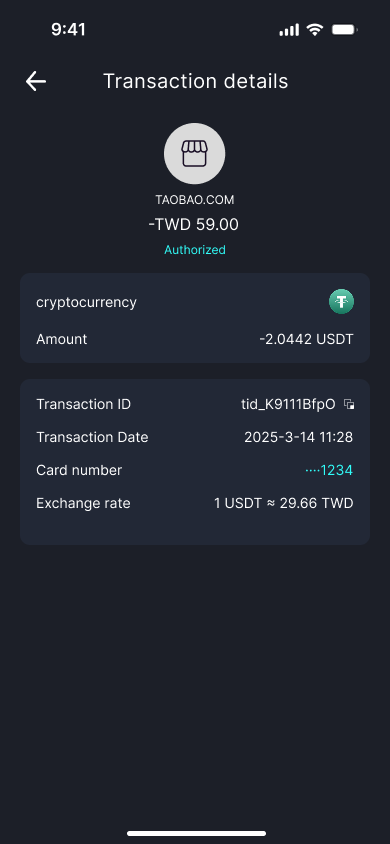
Tap any record to view the transaction details.\
Note: Some billing statements may reflect exchange rate fluctuations.

<div align="left"><figure><img src="https://2386722297-files.gitbook.io/~/files/v0/b/gitbook-x-prod.appspot.com/o/spaces%2F1dwmmVC3sMPPZcnRJVvC%2Fuploads%2Fwvvdsgzq92HOumgShI14%2F%E8%99%9A%E6%8B%9F%E5%8D%A1%E4%BA%A4%E6%98%93%E8%AF%A6%E6%83%85.png?alt=media&#x26;token=52465b2b-e4cb-471d-9840-e7361c62a6bf" alt=""><figcaption></figcaption></figure></div>
{% endstep %}
{% endstepper %}